
.jpg?upscale=true&upscale=true&width=560&name=banner_careerbird%20(1).jpg) |
One major new feature to preview this month and a whole slew of “quality of life” improvements that make Career Bird easier to administer and more intuitive to use as an employee. |
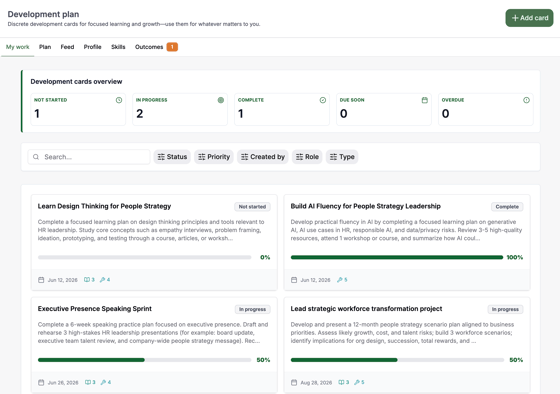
Sneak Peek: Individual Development Plan (IDP)The Individual Development Plan is a major new capability entering beta testing in June, with full release planned for July. This feature will enable employees and managers to collaboratively create personalized development plans by creating development cards that connect skill building, learning resources, on-the-job projects, and measurable business outcomes into a single, actionable, and trackable experience.
|
 |
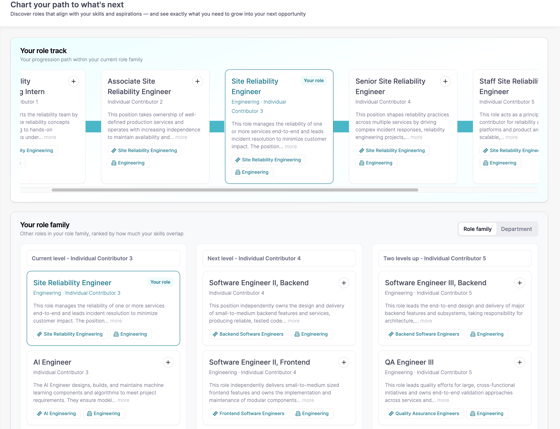
Career Explorer simplifies role discovery.Career Explorer now makes it easier for employees to visualize their career path, explore new roles within their job family or department, and discover opportunities across the broader organization. Coming next, employees will be able to identify and save “target roles,” helping them create focused development plans to build the skills and experiences needed to achieve their career goals. (link)
|
 |
|
Learning Resources adds visual skill filteringThe Learning Resources module now delivers a more personalized development experience by progressively surfacing the learning resources most relevant to each employee’s key skills, role, and career goals — helping employees focus on the development opportunities that matter most. (link) |
.png?upscale=true&upscale=true&width=560&name=image%20(2).png) |
|
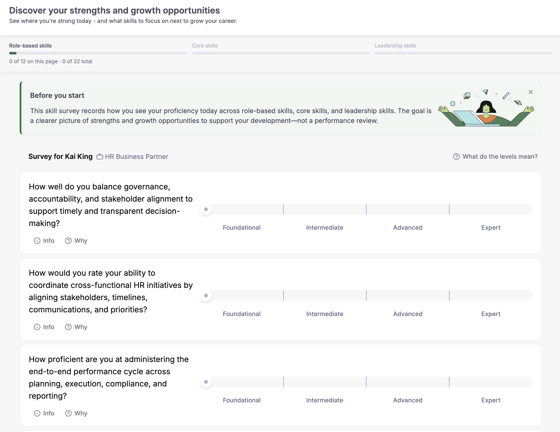
Skill survey design update
The Skills Survey now features progression indicators, more explanatory text and re-written questions to provide clarity and improve ease of use. |
 |
|
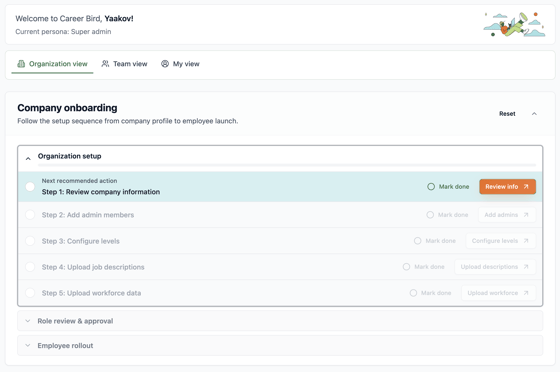
New admin capabilitiesOrganizational Admins will now have several powerful new capabilities, including a) an onboarding dashboard checklist (coming soon/shown below), b) auto-assigning job families, c) bulk deactivating users & deleting roles, and d) bulk uploading of job descriptions. |
 |