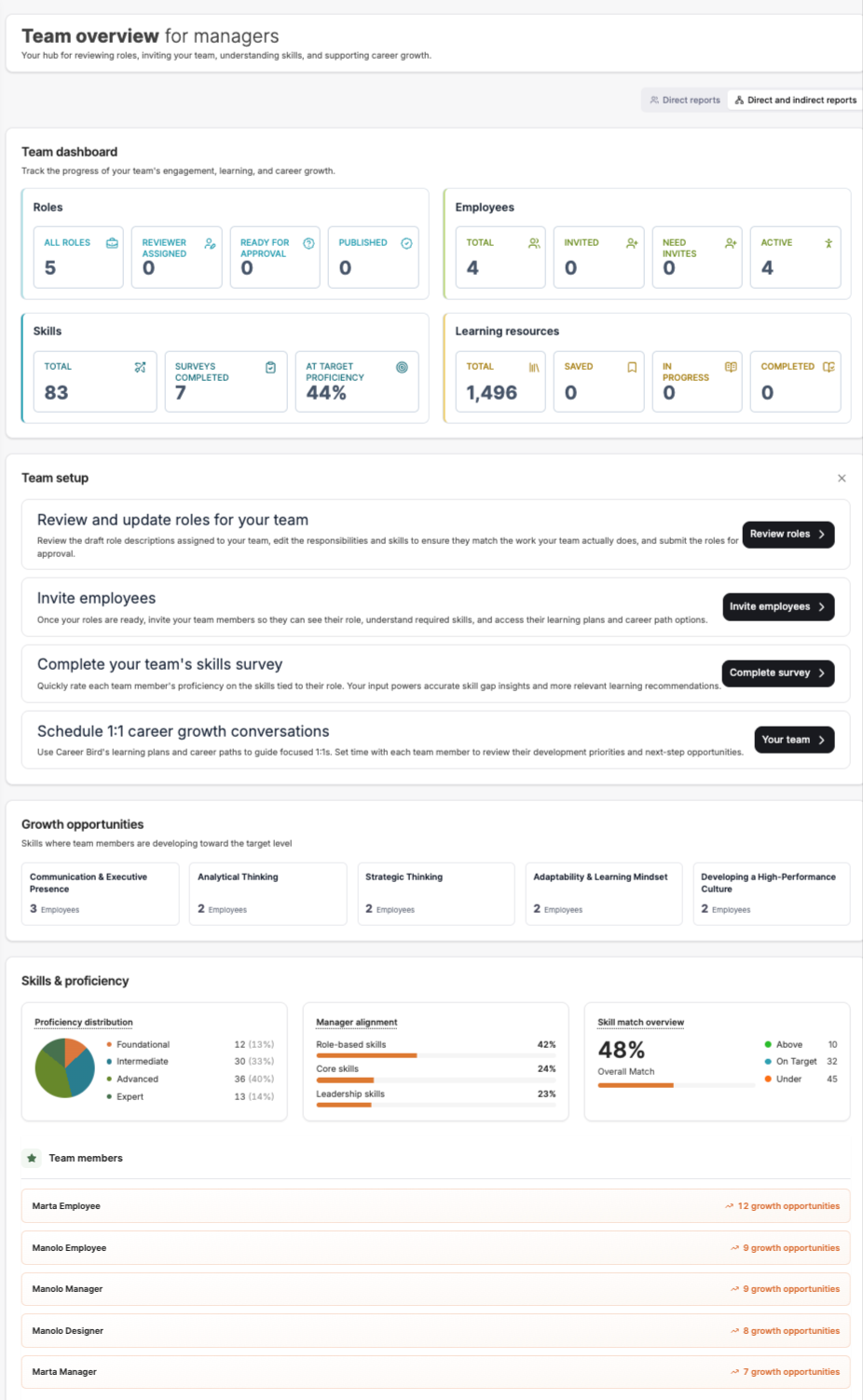
The Manager Dashboard is your central hub for managing your team’s:
- Roles and responsibilities
- Skill development
- Performance alignment
- Career growth
It gives you visibility into both individual and team-wide progress.
Why this matters
The Manager Dashboard helps you:
- Understand your team’s strengths and gaps
- Ensure roles are accurate and aligned
- Guide employee development
- Drive consistent performance across your team
Getting started as a manager Step 1: Review and update roles
Ensure each team member has an accurate role description.
You can:
- Review assigned roles
- Edit responsibilities and skills
- Submit roles for approval
This ensures your team is aligned on expectations.
Step 2: Invite employees
Once roles are ready:
- Invite your team members to the platform
- They will gain access to their role, skills, and career path
Step 3: Complete skill surveys
As a manager, you will:
- Assess each team member’s skills
- Provide your perspective on their proficiency
This enables:
- Skill calibration
- Accurate growth insights
- Better development planning
Step 4: Schedule career conversations
Use Career Bird to guide structured 1:1s.
Focus on:
- Skill gaps
- Career progression
- Development priorities
Dashboard overview Team metrics
At the top of the dashboard, you’ll see a summary of:
Roles
- Total roles
- Roles assigned
- Roles pending approval
- Published roles
Employees
- Total employees
- Invited users
- Pending invites
- Active users
Skills
- Total skills
- Surveys completed
- % at target proficiency
Learning resources
- Total resources
- Saved
- In progress
- Completed
Why this matters
This gives you a quick snapshot of team engagement and progress.
Team setup section
This section guides your core actions as a manager:
- Review roles
- Invite employees
- Complete surveys
- Schedule 1:1s
These are your key responsibilities to activate the platform.
Growth opportunities
This section highlights:
- Skills where your team is below target
- Areas with the most development needs
You can use this to:
- Prioritize team training
- Identify common skill gaps
- Guide team-wide development initiatives
Skills & proficiency insights Proficiency distribution
Shows how your team is distributed across levels:
- Foundational
- Intermediate
- Advanced
- Expert
Manager alignment
Shows alignment across skill categories:
- Role-based skills
- Core skills
- Leadership skills
Skill match overview
Indicates how well your team matches expected skill levels:
- Above target
- On target
- Below target
Why this matters
These insights help you:
- Understand team capability
- Identify risk areas
- Track improvement over time
Team members
At the bottom of the page, you’ll see:
- Each team member
- Their number of growth opportunities
This allows you to:
- Quickly identify who needs the most support
- Prioritize coaching and development
How to use this dashboard effectively
- Review it regularly (weekly or biweekly)
- Focus on high-impact gaps
- Use it to prepare for 1:1s
- Track progress over time
- Align development with business needs
Best practices
- Ensure roles are accurate before reviewing skills
- Be consistent in skill evaluations
- Focus on patterns, not just individuals
- Use data to guide conversations, not replace them
- Support employees with clear next steps
Summary
The Manager Dashboard helps you:
- Monitor team performance and growth
- Identify skill gaps and opportunities
- Guide employee development
- Drive alignment across your team